Designing Your Signature Style: A Guide to Stripe Paper Templates
Every successful design project relies on a foundation of high-quality visual assets. Whether you are a scrapbooker creating a family heirloom, a graphic designer building a client’s brand identity, or a small business owner crafting social media content, the textures behind your text and images play a critical role. A solid color background often feels flat and uninspired. This is where patterned papers, specifically striped designs, offer a timeless solution. They provide rhythm, depth, and personality without overwhelming the primary content.
The challenge for many creators is finding the exact right stripe. Commercial stock sites offer thousands of options, but they rarely match your specific brand palette or the exact hex codes of your current project. You might find a perfect layout in blue, but you need it in sage green and gold. This limitation often leads to compromises in design, resulting in work that feels generic rather than custom. The ability to generate your own assets is a game-changer for maintaining a consistent and professional aesthetic.
Unlocking Total Creative Control
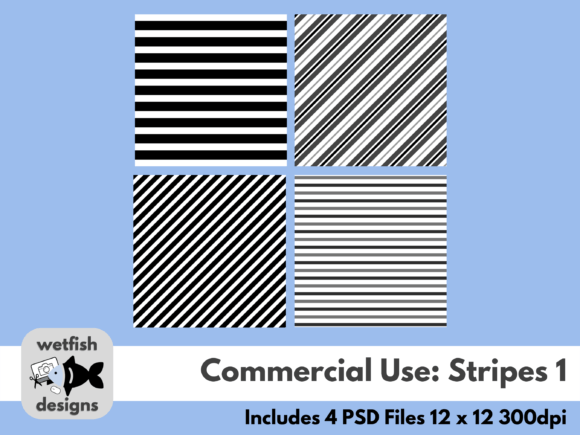
This is the core value of the PSD Layered Stripe Paper Templates. Instead of a static image file that you cannot modify, this set provides you with the raw ingredients to bake your own design assets. The concept is simple yet powerful: you are given four distinct stripe patterns at a high-resolution 300dpi. These are not flattened JPEGs; they are fully layered Photoshop files. This means every single stripe exists on its own layer, allowing you to change colors, adjust opacity, or even delete elements to create entirely new compositions.
For the entrepreneur or marketer, this level of control is essential. Imagine you are launching a new product line. You have specific colors defined in your brand guidelines. With these templates, you can instantly generate digital backgrounds that perfectly align with your brand identity. You do not need to search for "corporate blue stripe paper." You simply open the PSD file, select the layer, and fill it with your exact brand color. The result is a cohesive look across your website, packaging design, and social media graphics that reinforces brand recognition.
Visual Characteristics and Style
The appeal of striped paper lies in its versatility. The included templates in this set cover a range of styles, from evenly spaced pinstripes to bold, varying-width bands. This variety allows you to influence the "personality" of your design. A thin, closely spaced stripe often reads as professional, structured, and formal—ideal for corporate presentations or elegant wedding invitations. Conversely, wide, bold stripes feel playful, energetic, and modern, making them perfect for children’s scrapbook pages or trendy lifestyle blogs.
Because the files are layered, you have limitless possibilities. You are not restricted to a two-tone stripe. You could create a gradient effect by using different shades of the same hue, or you could create a complex color block pattern using the stripe layers as a mask. This flexibility makes the PSD Layered Stripe Paper Templates a staple in any digital asset library. It bridges the gap between a simple texture and a complex design element, giving you the freedom to experiment with color theory and composition in real-time.
Practical Applications for Modern Creators
Understanding where to use these assets is just as important as having them. The utility of high-quality stripe paper extends far beyond traditional paper crafts. In the realm of web design, subtle striped backgrounds are often used to break up large sections of content, guiding the user’s eye down the page without the distraction of a busy image. By using these templates to create a custom background, you ensure that the website feels unique rather than built from a generic theme.
For content creators and publishers, visual hierarchy is key. A striped background behind a pull quote or a call-to-action block can instantly draw attention to the most important part of your layout. When creating digital planners or printables, these patterns help organize information visually. They create boundaries and categories without the need for heavy black lines, resulting in a softer, more inviting reading experience.
Enhancing Brand Perception and Professionalism
Consistency is the hallmark of a professional brand. When your digital backgrounds, lead magnets, and social media posts all share a cohesive visual language, it builds trust with your audience. Using the PSD Layered Stripe Paper Templates ensures that you can maintain this consistency even as trends change. If you need to update your brand colors for a seasonal campaign, you don't need to buy new assets; you simply update the layers in your existing templates.
This approach also speaks to the quality of your work. Clients and customers notice the details. A background that looks "off-the-shelf" can cheapen the perception of your product. However, a background that has been thoughtfully colored and customized to complement the main subject demonstrates a higher level of care and expertise. It signals that you value your visual presentation, which translates to a perception of higher value in your services or products.
Integrating Templates into Your Workflow
For those accustomed to working with stock images, integrating a layered workflow might seem daunting, but it is actually quite straightforward. The process begins with color selection. Before you even open the PSD file, identify the primary and secondary colors of your project. This could be based on a client’s brand book, a photo you are using, or a specific mood you want to evoke.
Once you open the template, use the "Fill" tool or "Color Overlay" layer styles to apply your chosen colors to the stripe layers. This non-destructive method allows you to toggle colors on and off to see what works best. You might find that a high-contrast combination (like black and white) works for a bold statement, while a low-contrast combination (like pale blue and cream) works for a subtle texture. The ability to toggle visibility on each layer means you can also simplify the pattern, removing every other stripe to create a more minimalist look.
Combining with Other Design Assets
These templates are designed to play well with others. A common technique in digital scrapbooking and collage-style graphic design is layering. You can place a photo over a striped background and use a blending mode like "Multiply" or "Overlay" to let the texture show through the image. This creates a vintage or artistic effect that is very popular in editorial design and album covers.
Furthermore, because these are high-resolution 300dpi files, they are suitable for print. You can use them to create custom stationery, gift wrap, or packaging inserts. For small business owners, this is a cost-effective way to create branded packaging. Instead of paying for custom-printed boxes with a minimum order of 1,000 units, you can print your own striped wrapping paper or tissue paper inserts on demand, allowing for flexibility as your brand evolves.
Final Thoughts on Asset Management
In the fast-paced world of digital content creation, having a library of versatile, editable assets is a strategic advantage. The PSD Layered Stripe Paper Templates offer a practical solution to the common problem of static stock art. They empower you to take control of your visual environment, ensuring that every background, texture, and pattern you use is perfectly aligned with your vision.
By investing in tools that offer customization rather than just finished products, you future-proof your creative process. Whether you are designing a complex brand identity system or simply making a birthday card for a friend, the ability to craft your own striped digital paper ensures your work always stands out. It is about moving from being a consumer of design to being a creator of design, one layer at a time.