Streamlining Your Workflow with Org Charts PowerPoint Templates
There is a specific kind of frustration that sets in when you are trying to explain a complex company structure using a blank slide. You start with the CEO at the top, draw a few lines, and suddenly the text boxes are misaligned, the colors clash, and the hierarchy becomes a visual mess rather than a clear roadmap. In the fast-paced world of business and creative strategy, clarity is currency. Whether you are onboarding a new team, pitching investors, or mapping out a marketing department, the visual representation of your organization matters just as much as the data itself. This is where a dedicated design asset like the Org Charts PowerPoint Templates steps in to bridge the gap between raw data and professional presentation.
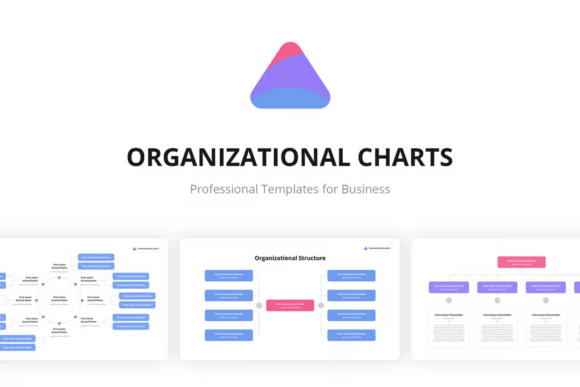
When we talk about presentation tools, we often focus on the "what"—the content of the slides. However, the "how"—the visual execution—is equally critical. The Org Charts PowerPoint Templates package is built on the premise that structural diagrams should not look like they were drawn in a rush. With 32 unique slides included, this collection offers a comprehensive library of visual solutions for hierarchical mapping. It moves beyond the standard, boring pyramid shapes that come as default in most software, offering instead a variety of layouts that feel modern, clean, and designed with contemporary branding in mind.
Visual Style and Functional Aesthetics
One of the first things you notice about these templates is the adherence to modern typography and clean design principles. The visual personality of this package is professional yet approachable. It avoids the clutter that plagues many corporate templates. Instead, it relies on strong visual hierarchy, utilizing ample white space and structured grids. This is not just about placing boxes on a line; it is about creating a flow that guides the viewer’s eye naturally from top management down to the departmental level.
The templates are designed with a 16x9 HD aspect ratio, ensuring they look sharp on widescreen monitors and projectors. In an era where remote work and digital presentations are the norm, pixel-perfect clarity is non-negotiable. The fact that these assets are Retina ready means that if you are presenting on high-resolution displays, such as a MacBook Pro or a modern 4K monitor, the lines will be crisp and the text will be legible. This attention to technical detail elevates the perceived value of your presentation, subconsciously signaling to your audience that you pay attention to quality.
Furthermore, the inclusion of the free Google font PT Sans is a strategic design choice. PT Sans is a humanist sans serif font known for its warmth and excellent readability at various sizes. It strikes a balance between being geometric and organic, making it suitable for both corporate environments and creative agencies. By standardizing the typography, the templates ensure that your visual identity remains consistent across all 32 slides. You do not need to worry about licensing issues or font substitution errors when sharing the file with colleagues; the typeface is accessible and universally respected for its clean aesthetic.
Practicality and Ease of Use
For the entrepreneur or the busy project manager, time is a resource that cannot be wasted on fiddling with design software. This is where the user experience of the Org Charts PowerPoint Templates truly shines. The promise of "2 Click to customization" is not an exaggeration. The files are structured using only editable shapes. This means that if you need to add a new branch to the marketing team or rename a department, you are not fighting with locked layers or rasterized images.
This level of editability is crucial for maintaining a dynamic brand identity. As small business owners and marketers, our organizations are not static. Teams shift, roles evolve, and structures change. A rigid template becomes obsolete the moment a hire is made. However, because these shapes are fully editable, the template grows with you. You can adjust the color palette to match your specific brand hex codes, resize elements to emphasize certain departments, or even repurpose the structural nodes for project timelines or workflow processes. The .PPTX file format ensures broad compatibility, supporting not just Microsoft PowerPoint but also Keynote and Google Slides, which is vital for collaborative teams using mixed software environments.
Strategic Application in Business and Design
Understanding how to leverage an org chart goes beyond simple administration. From a brand strategy perspective, a well-designed organizational chart communicates stability and structure to potential investors or partners. It visualizes the talent within your company. For designers and creative professionals, these slides can serve as the backbone for complex project proposals. Imagine pitching a rebranding campaign to a client; using these templates to map out the agency team that will be handling their account adds a layer of professionalism that generic slides simply cannot provide.
Consider the impact on internal communications. Human Resources departments often struggle with engaging employees during policy rollouts or restructuring. By utilizing a visually appealing, Retina ready org chart, you transform a potentially dry topic into a digestible visual aid. The clarity of the hierarchy helps employees understand reporting lines, reducing confusion and improving operational efficiency. This is where the intersection of design assets and operational management creates real-world value.
Moreover, for content creators and bloggers who are building personal brands, the concept of an "org chart" can be adapted creatively. You might use these layouts to map out your content ecosystem, showing how your blog, podcast, and social media channels feed into your central brand identity. The flexibility of the editable shapes allows for this kind of creative reinterpretation, making the templates useful even for those who don't run traditional corporate hierarchies.
Evaluating Fit and Implementation
When integrating any new design asset into your workflow, it is helpful to do a quick audit of your current needs. If your current presentations feel disjointed or if you find yourself spending hours aligning text boxes, a professional template set is a worthwhile investment. The Org Charts PowerPoint Templates are particularly effective for those who value a clean, sans-serif aesthetic that aligns with modern web design trends.
However, successful implementation requires more than just downloading a file. You should consider how these charts fit into your broader visual language. If your brand uses a specific serif font for headlines, you might consider pairing it with the included PT Sans for the body text within the charts to maintain brand consistency while ensuring legibility. Testing font pairing is a key part of the design process; the clean nature of PT Sans makes it a versatile partner for both script fonts and geometric display typefaces.
Ultimately, the goal of an organizational chart is to reduce cognitive load. It takes complex information—people, roles, relationships—and organizes it spatially so the brain can process it quickly. By using a template that is already optimized for visual hierarchy and readability, you are removing the design burden from yourself and focusing on the content. Whether you are a freelancer mapping out your client load or a marketing director presenting the Q4 strategy, having a reliable, high-quality set of Org Charts PowerPoint Templates ensures that your structure is communicated with the same professionalism and clarity that you bring to your actual work.