Professional Pricing Guides: A Template System for Service Providers
Transform Client Communication with a Polished Visual Framework
For service providers, presenting pricing is often the most awkward part of the business conversation. It can feel transactional and disjointed from the creative work you actually do. A well-designed pricing guide changes that dynamic entirely. It transforms a simple list of fees into a cohesive story about your value, your process, and your professionalism. This system of Services Pricing Templates provides a structured yet flexible framework to do exactly that. It’s a collection of pre-designed pages that work together to guide a potential client from your introduction to a clear call to action, all while maintaining a consistent and elegant brand identity.
The visual personality of these templates leans towards clean, modern minimalism with thoughtful touches of elegance. Think ample white space, balanced layouts, and a restrained color palette that you can easily customize to match your brand. The style avoids trendy graphics that will date quickly, focusing instead on timeless structure and clear typography. This makes the overall appeal broad and adaptable—it feels professional and trustworthy for a corporate consultant, yet approachable and creative for a photographer or coach. The design does the heavy lifting of establishing credibility, allowing your content to shine without visual competition.
Where This System Fits: From Digital Proposals to Print Materials
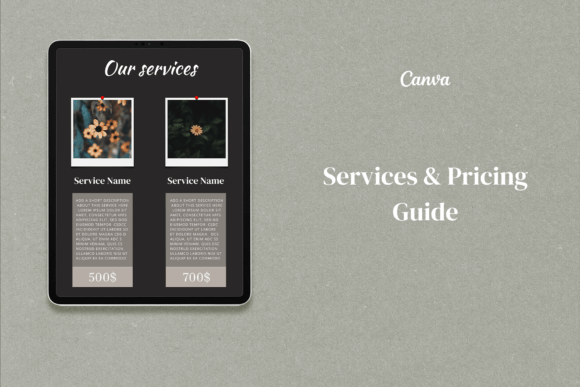
The true strength of a template system like this lies in its versatility across different stages of client engagement. It’s not just a single document; it’s a suite of design assets. The Cover pages set the tone for your proposal or welcome packet. The Pricing pages offer multiple layouts to detail your packages, whether you prefer a side-by-side comparison, a tiered list, or a more narrative explanation. The inclusion of a dedicated Invoice template is a practical touch that ensures even your billing feels on-brand and organized. Finally, the CTA (Call to Action) Page is strategically placed to prompt the next step, whether that's booking a discovery call or signing a contract.
This system works exceptionally well in both digital and print realms. Sending a beautifully formatted PDF pricing guide as part of your initial inquiry response immediately elevates the client experience. It’s far more impactful than a plain email with a bulleted list. For in-person meetings or high-value clients, you can print the pages to create a tangible lookbook or proposal booklet. The templates are provided in both A4 and US Letter sizes, acknowledging the practical needs of a global audience. This dual sizing is crucial for web design freelancers sending digital files internationally or coaches who may print materials for local workshops.
The Mechanics of a Strong Pricing Document
A great pricing guide does more than list numbers; it manages visual hierarchy and readability to make complex information digestible. The layouts in this system are built with this principle in mind. They use strategic placement of headings, ample spacing, and clear typographic contrast to separate different service tiers or package details. This isn't about flashy display font choices; it’s about creating a logical flow that the eye can follow effortlessly. The result is a document that feels comprehensive yet easy to navigate, reducing cognitive load for your potential client.
Consistency across all your client-facing materials builds brand recognition and professionalism. When your pricing guide, invoice, and proposal share the same design language—consistent margins, complementary fonts, a unified color story—it tells a client you pay attention to details. This subconscious signal of reliability is powerful. It influences brand perception long before a client sees your actual work. Using these templates ensures that every touchpoint, from the first pricing inquiry to the final payment, reinforces the quality and care you bring to your services.
Making It Your Own: Practical Guidance for Implementation
Getting started is straightforward, especially with a platform like Canva. No graphic design knowledge is required to edit text, swap colors, or upload your own logo. The key to success is to treat the templates as a starting point for your brand identity, not a rigid cage. Start by inputting your brand’s color codes and selecting fonts that align with your existing logo design and website. If your brand uses a sans serif font for body text, apply that consistently throughout the guide. If you have a script font for accents, use it sparingly for headings or pull quotes to maintain readability.
Consider your audience when customizing. A photographer might use the Cover page to showcase a stunning hero image from a recent shoot. A web designer could use the Pricing pages to neatly outline deliverables for different project scopes. The CTA Page is your chance to be direct and clear—whether that’s “Book Your Session” or “Schedule a Free Consultation.” Test the final document by sending it to a trusted colleague or friend. Ask them if the pricing is clear and if the document feels like a natural extension of your brand. This real-world feedback is invaluable for refining your font pairing and layout choices before you start using it with paying clients.
Ultimately, a professional pricing guide built with a solid template system is a strategic asset. It saves you hours of design time, eliminates the guesswork of document layout, and presents your services with the clarity and polish they deserve. It’s a practical step towards more consistent, confident, and professional client onboarding. By investing a small amount of time to customize these Services Pricing Templates, you create a reusable tool that works for you long after the initial setup, helping you win better clients and manage your business with greater ease.